
Most Google Ads accounts do not fail loudly. They keep spending, keep producing some leads, and keep looking "okay" in the dashboard. The waste hides in search terms nobody reads, conversion actions nobody checked, locations nobody narrowed and leads nobody followed to a sale. This Google Ads audit checklist walks through 50 specific checks, in the order I would review an account, so you can find where money is leaking and decide what to fix first.

Quick answer: what is a Google Ads audit?
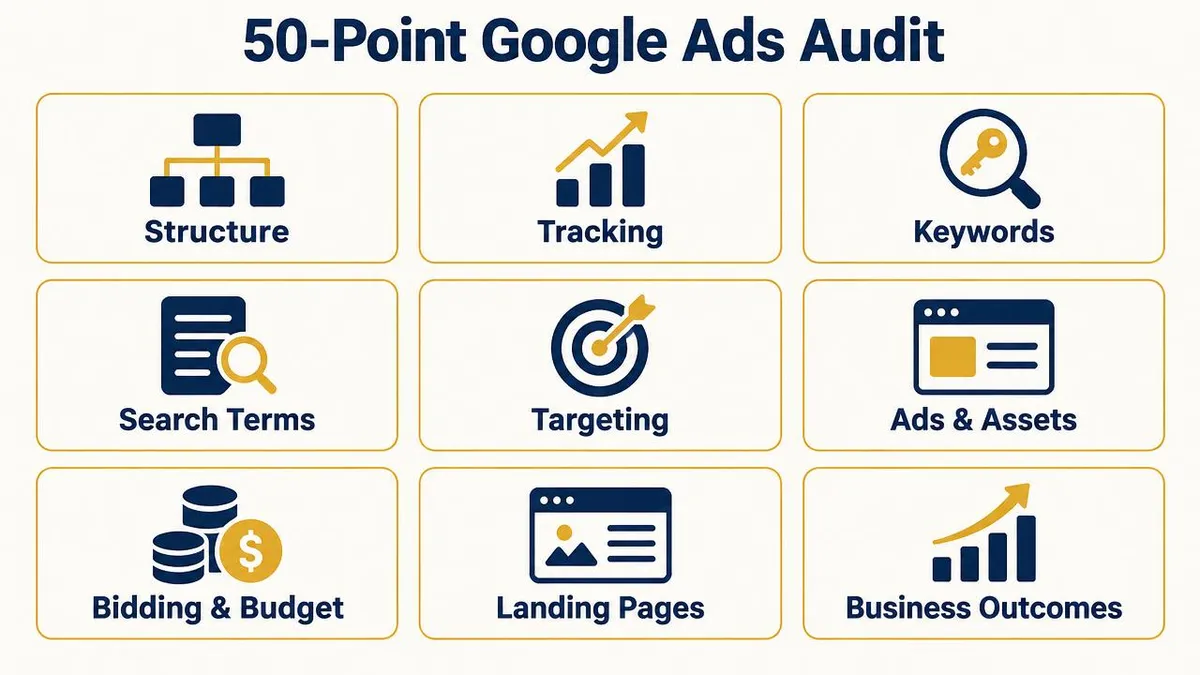
A Google Ads audit is a structured review of your account's conversion tracking, campaign structure, keywords, search terms, settings, ads, bidding, landing pages and business results. Its purpose is to find wasted ad spend and identify the changes most likely to improve qualified leads, customers and revenue.
What should it include? The nine areas in this checklist. How do you start? Verify tracking first, because every other decision depends on it. Audit vs optimisation? An audit diagnoses what is wrong and ranks the fixes; optimisation is the ongoing work of making those fixes and improving week by week.
Why Google Ads can waste money even when campaigns generate leads
A campaign can hit its cost-per-lead target and still lose money. That happens when the account is optimising for the wrong thing. If a form fill is counted as success, Google will find more form fills, including from students, job seekers, people outside your area and people looking for the cheapest option.
The dashboard sees leads. The business sees missed calls, junk enquiries and a sales team that has stopped trusting marketing. That gap is exactly what an audit should expose. I covered the business side of this in why ads can work while the business still is not growing.
50-point Google Ads audit checklist
Each check below tells you what to look at, what a problem looks like, why it matters and what to do. Tick them off as you go; each passed check is worth 2 points in the audit score later in the article.
1. Account & campaign structure
Structure decides how clearly you can see, control and fund what is working.
1. Campaign objective matches the business goal
- Check:
- Does every campaign have an objective that reflects what the business needs: leads, calls, sales or store visits?
- Warning sign:
- A lead-generation business running campaigns built for traffic or awareness.
- Why it matters:
- The objective shapes the goals and bidding options Google offers you.
- Action:
- Rebuild or re-goal campaigns around the outcome the business actually pays for.
2. Campaign structure reflects how you sell
- Check:
- Are campaigns split by service, product line or margin in a way that matches how the business earns money?
- Warning sign:
- One campaign mixing high-value and low-value services with a single budget.
- Why it matters:
- Mixed campaigns let cheap, easy clicks absorb budget meant for profitable services.
- Action:
- Separate services with different values, margins or audiences into their own campaigns.
3. Naming is clear and consistent
- Check:
- Can someone new understand each campaign and ad group from its name?
- Warning sign:
- Names like "Campaign #3 copy" or "Test new".
- Why it matters:
- Unclear names lead to wrong edits and slow reporting.
- Action:
- Adopt a simple convention such as Network | Service | Location | Bidding.
4. Segmentation is useful, not excessive
- Check:
- Are campaigns split only where the split changes budget, bids or messaging?
- Warning sign:
- Dozens of tiny campaigns, each with too little data to learn from.
- Why it matters:
- Automated bidding needs enough conversions per campaign to work well.
- Action:
- Merge thin campaigns that share goals; keep splits that change a decision.
5. Ad groups are tightly themed
- Check:
- Does each ad group contain keywords that share one intent and one landing page?
- Warning sign:
- "AC repair", "AC installation" and "AC price" in one ad group with one ad.
- Why it matters:
- Tight themes make ads and pages more relevant to the search.
- Action:
- Group keywords by intent and give each group matching ads and a matching page.
6. No duplicate or overlapping campaigns
- Check:
- Are two campaigns targeting the same searches and locations?
- Warning sign:
- Two campaigns bidding on the same terms in the same city.
- Why it matters:
- Overlap splits data and makes it hard to know which campaign is actually working.
- Action:
- Consolidate or clearly separate targeting, and use negatives to divide traffic where needed.
7. Budget allocation follows results
- Check:
- Is the most budget going to the campaigns that produce qualified leads or sales?
- Warning sign:
- The biggest budget sits on a campaign with the weakest lead quality.
- Why it matters:
- Budget is the strongest lever you control.
- Action:
- Rank campaigns by cost per qualified lead or revenue and rebalance gradually.
2. Conversion tracking & measurement
If the data is wrong, every optimisation built on top of it is wrong too. Audit this first.
For a deeper walkthrough, see conversion tracking from click to sale.
8. Conversion actions are the right ones
- Check:
- Do the conversion actions represent real enquiries or sales?
- Warning sign:
- Page views, button clicks or scroll depth counted as conversions.
- Why it matters:
- Automated bidding chases whatever you call a conversion.
- Action:
- Keep only actions that indicate a real enquiry, call, booking or purchase as conversions.
9. Primary vs secondary is set correctly
- Check:
- Which actions are primary (used for bidding) and which are secondary (observed only)?
- Warning sign:
- Low-value micro-actions set as primary alongside real leads.
- Why it matters:
- Google documents that primary actions are used for bidding and the Conversions column.
- Action:
- Make real leads or sales primary; move supporting actions to secondary.
10. No duplicate conversions
- Check:
- Is the same lead being counted twice, for example by a Google Ads tag and an imported GA4 event?
- Warning sign:
- Conversions in Google Ads far higher than leads actually received.
- Why it matters:
- Duplicates inflate results and push bidding in the wrong direction.
- Action:
- Keep one source per action and set counting to "One" for lead actions.
11. Form tracking fires on real submissions
- Check:
- Does the form conversion fire only after a successful submission?
- Warning sign:
- Conversions recorded on button click even when the form fails validation.
- Why it matters:
- Inflated form conversions hide broken forms and poor lead flow.
- Action:
- Track the thank-you page or a confirmed success event, then test it with a real submission.
12. Phone calls are tracked
- Check:
- Are calls from ads and from the website counted, with a sensible minimum duration?
- Warning sign:
- A call-heavy business with no call conversions at all.
- Why it matters:
- Untracked calls make good campaigns look weak.
- Action:
- Set up call assets with call reporting and website call tracking where available.
13. Purchase or revenue values are passed
- Check:
- For e-commerce or value-based leads, are real values sent with conversions?
- Warning sign:
- Every conversion has the same default value, or no value.
- Why it matters:
- Value-based bidding can only optimise for value it receives.
- Action:
- Pass transaction values for sales and realistic values for lead types where possible.
14. CRM or offline outcomes feed back
- Check:
- Do qualified leads and closed sales flow back into Google Ads?
- Warning sign:
- Google Ads only knows about form fills, never about which leads bought.
- Why it matters:
- Without outcomes, Google optimises for lead volume, not customers.
- Action:
- Import offline conversions or use enhanced conversions for leads to send qualified stages back.
3. Keywords & search intent
Keywords are the brief you give Google about who you want to reach.
15. Keywords are relevant to what you sell
- Check:
- Does every active keyword describe something you actually offer?
- Warning sign:
- Keywords for services you do not provide or locations you do not serve.
- Why it matters:
- Irrelevant keywords buy clicks that cannot convert.
- Action:
- Pause keywords outside your offer and service area.
16. Search intent is commercial
- Check:
- Do keywords signal someone ready to buy or enquire, rather than learn?
- Warning sign:
- Heavy spend on "what is", "how to" or "meaning" style keywords.
- Why it matters:
- Research intent is valuable for content, rarely for paid lead generation.
- Action:
- Prioritise service + location, near me, price, hire and book style intent.
17. Match types suit your data and control
- Check:
- Are broad, phrase and exact match used deliberately?
- Warning sign:
- Broad match on a new account with poor tracking and manual bids.
- Why it matters:
- Broad match relies on strong conversion signals and Smart Bidding to stay on target.
- Action:
- Use broad only with reliable tracking and Smart Bidding; otherwise lean on phrase and exact.
18. Low-intent keywords are limited
- Check:
- Are generic one-word or category keywords draining budget?
- Warning sign:
- "Marketing", "insurance" or "interior" as standalone keywords.
- Why it matters:
- Generic terms are expensive and vague.
- Action:
- Replace them with specific, qualified variations.
19. Keywords match the ads
- Check:
- Does the ad clearly reflect the keyword's intent?
- Warning sign:
- A "kitchen renovation" keyword showing a generic "Home services" ad.
- Why it matters:
- Relevance affects expected CTR, ad relevance and therefore Quality Score.
- Action:
- Write ads per ad group that speak to that exact need.
20. Keywords match the landing page
- Check:
- Does the page the click lands on answer the same search?
- Warning sign:
- Every keyword sends traffic to the homepage.
- Why it matters:
- Landing page experience is one of the Quality Score components Google reports.
- Action:
- Send each theme to a page about that service, with the next step visible.
21. No keyword cannibalisation
- Check:
- Is the same keyword active in several ad groups or campaigns?
- Warning sign:
- Identical keywords competing in two places with different bids.
- Why it matters:
- You lose control over which ad and page show.
- Action:
- Keep each keyword in one place; use negatives to route traffic.
22. Poor performers are reviewed
- Check:
- Which keywords have spent meaningfully without qualified results?
- Warning sign:
- Keywords spending for months with no leads or only junk leads.
- Why it matters:
- Small leaks add up across a large keyword list.
- Action:
- Pause, narrow or restructure keywords after a fair data window.
4. Search terms & negative keywords
Keywords are what you bid on. Search terms are what people actually typed. The gap is where most waste lives.
23. The Search terms report is reviewed regularly
- Check:
- When was the Search terms report last opened and acted on?
- Warning sign:
- Nobody has looked at it in months.
- Why it matters:
- Google can find more traffic, but only you know which searches turn into customers.
- Action:
- Review it weekly in active accounts and act on what you see.
24. Irrelevant searches are removed
- Check:
- What share of spend goes to searches unrelated to your offer?
- Warning sign:
- Searches for jobs, competitors' login pages, free tools or unrelated products.
- Why it matters:
- Every irrelevant click is pure waste.
- Action:
- Add clear negatives at the right level: account, campaign or ad group.
25. Research searches are controlled
- Check:
- Are informational searches taking budget from buyers?
- Warning sign:
- "How to fix", "DIY", "course", "syllabus" or "PDF" style searches.
- Why it matters:
- These people are learning, not hiring.
- Action:
- Add negatives for research modifiers that do not fit your offer.
26. Negative keyword coverage is solid
- Check:
- Is there a maintained negative list covering common waste themes?
- Warning sign:
- No shared negative lists, or only a handful of terms.
- Why it matters:
- Coverage prevents the same waste returning in every new campaign.
- Action:
- Build shared lists (jobs, free, DIY, education, irrelevant locations) and apply them.
27. Negatives are not over-blocking
- Check:
- Are any negatives stopping good searches?
- Warning sign:
- A broad negative like "price" blocking "AC repair price in Pune".
- Why it matters:
- Over-blocking quietly cuts valuable traffic.
- Action:
- Check negatives against your converting search terms and fix conflicts.
5. Targeting & campaign settings
Settings are easy to set once and forget. They are also where accounts quietly leak.
Local businesses should also read Google Ads for local businesses in India for radius and pin-code targeting.
28. Location targeting covers only where you serve
- Check:
- Do targeted locations match your real service area?
- Warning sign:
- A Pune business targeting all of India or all of Maharashtra.
- Why it matters:
- Out-of-area clicks rarely convert.
- Action:
- Target your service area by city, pin code or radius; read our local targeting guide.
29. Location option is set to presence where needed
- Check:
- Is the campaign set to people in or regularly in your locations, or to people interested in them?
- Warning sign:
- Clicks from other states or countries in the locations report.
- Why it matters:
- Interest-based targeting can show ads to people far outside your area.
- Action:
- Use "Presence" for local services and exclude areas you never serve.
30. Language targeting is sensible
- Check:
- Do language settings fit your audience and ad copy?
- Warning sign:
- Only English selected when many customers use Hindi or Marathi browser settings, or the reverse.
- Why it matters:
- Language settings filter who is eligible to see ads.
- Action:
- Match languages to your customers and the language of your ads and page.
31. Audience segments are used deliberately
- Check:
- Are audience segments in observation or used as signals, and are remarketing lists in place?
- Warning sign:
- No audience data at all, or targeting narrowed so far that volume collapses.
- Why it matters:
- Audience data improves bidding and reporting.
- Action:
- Add relevant segments in observation and build remarketing lists from site visitors.
32. Device performance is reviewed
- Check:
- Do mobile, desktop and tablet perform very differently?
- Warning sign:
- Mobile takes most spend but the form is hard to use on phones.
- Why it matters:
- Device gaps often reveal landing page problems, not bidding problems.
- Action:
- Fix the weak device experience first, then adjust if the gap persists.
33. Ad schedule matches when you can respond
- Check:
- Do ads run when your team can answer calls and enquiries?
- Warning sign:
- Call ads running at 2 a.m. with nobody to answer.
- Why it matters:
- Slow response turns paid leads into lost leads.
- Action:
- Align schedule with response capacity, especially for call-led campaigns.
34. Network and campaign settings are intentional
- Check:
- Are Search Partners or Display expansion switched on deliberately?
- Warning sign:
- Display Network enabled inside a Search campaign without anyone choosing it.
- Why it matters:
- Extra networks can add lower-intent traffic.
- Action:
- Review each network setting and segment results before keeping it.
6. Ads & assets
The ad is your first sales conversation. It should filter as well as attract.
35. Headlines match the search
- Check:
- Do headlines reflect the keywords and the specific service?
- Warning sign:
- Generic headlines like "Best Services" across every ad group.
- Why it matters:
- Relevant headlines earn more qualified clicks.
- Action:
- Write headlines per theme; pin only where the message must always appear.
36. Descriptions add proof and detail
- Check:
- Do descriptions explain what you do, for whom and why choose you?
- Warning sign:
- Descriptions that repeat the headlines.
- Why it matters:
- Descriptions help people decide before they click.
- Action:
- Add service details, areas served and a real reason to choose you.
37. The offer is clear
- Check:
- Would a searcher know exactly what they get by clicking?
- Warning sign:
- No offer at all, or vague promises.
- Why it matters:
- A clear offer improves both click quality and conversion rate.
- Action:
- State the concrete next step: free inspection, quote, consultation or price range.
38. The call to action fits the goal
- Check:
- Does the ad ask for the action you want: call, book, get a quote?
- Warning sign:
- "Learn more" on a campaign built for calls.
- Why it matters:
- The CTA sets expectations for what happens after the click.
- Action:
- Use a direct CTA that matches the conversion you track.
39. Assets are complete and relevant
- Check:
- Are sitelinks, callouts, structured snippets, call and location assets set up where relevant?
- Warning sign:
- Only headlines and descriptions, no assets.
- Why it matters:
- Assets give more ways to act and more information before the click.
- Action:
- Add relevant assets and remove any that point to weak or broken pages.
7. Bidding & budget
Bidding should follow the business outcome, and budget should follow proof.
40. Bidding strategy suits the data available
- Check:
- Is the strategy realistic for the conversion volume and data quality?
- Warning sign:
- Target CPA on a campaign with only a few conversions a month.
- Why it matters:
- Smart Bidding learns from conversion data; thin or noisy data leads to unstable results.
- Action:
- Use Maximise conversions or manual control until data is reliable, then add targets.
41. Bidding matches the business objective
- Check:
- Is the account optimising for what the business values most?
- Warning sign:
- Maximise clicks on a campaign meant to generate leads.
- Why it matters:
- The strategy decides what Google tries to get more of.
- Action:
- Bid for conversions or conversion value that reflect real outcomes.
42. Budget is distributed by value
- Check:
- Are budgets limited on strong campaigns while weak ones spend freely?
- Warning sign:
- Your best campaign is "Limited by budget" while a poor one is not.
- Why it matters:
- Budget constraints can hide your best opportunities.
- Action:
- Shift budget toward campaigns with better cost per qualified lead.
43. CPA or ROAS targets are realistic
- Check:
- Are targets based on actual margins and close rates?
- Warning sign:
- A target CPA set from a guess or copied from another business.
- Why it matters:
- Unrealistic targets either starve volume or overspend.
- Action:
- Work back from customer value and close rate to a target you can afford.
44. Scaling decisions are based on quality
- Check:
- Is spend increased only when qualified leads or sales hold steady?
- Warning sign:
- Doubling budget overnight because CPL looked low.
- Why it matters:
- Large sudden changes can disrupt learning and buy weaker traffic.
- Action:
- Scale in steps and watch qualified-lead cost, not just CPL.
8. Landing pages
Most wasted spend is decided after the click.
45. The page is relevant to the ad group
- Check:
- Does each ad group land on a page about that exact service?
- Warning sign:
- All traffic goes to a homepage with a slider and no clear next step.
- Why it matters:
- Relevance is the simplest conversion improvement.
- Action:
- Create focused pages for major services.
46. The message matches the ad
- Check:
- Does the headline repeat the promise the ad made?
- Warning sign:
- The ad offers a free inspection; the page never mentions it.
- Why it matters:
- Mismatch makes visitors feel misled and leave.
- Action:
- Mirror the ad's offer and wording at the top of the page.
47. The mobile experience works
- Check:
- Does the page load quickly and work smoothly on a phone?
- Warning sign:
- Slow load, tiny buttons, or a form hidden below a long scroll.
- Why it matters:
- In India most paid clicks are often mobile, so mobile friction is expensive.
- Action:
- Test on a real phone; simplify, compress and move the CTA up.
48. Conversion friction is low
- Check:
- How hard is it to enquire: number of fields, steps and distractions?
- Warning sign:
- Long forms, no phone or WhatsApp option, pop-ups everywhere.
- Why it matters:
- Every unnecessary step loses some interested people.
- Action:
- Ask only what you need to qualify and offer call or WhatsApp alternatives.
9. Lead quality & business results
The final two checks are the ones that decide whether Google Ads is worth it.
49. Lead quality and cost per qualified lead are known
- Check:
- Do you know how many leads were qualified and what each qualified lead cost?
- Warning sign:
- Only cost per lead is reported; sales says most leads are junk.
- Why it matters:
- Cheap leads can be the most expensive leads if none convert.
- Action:
- Tag leads in a CRM or sheet and report cost per qualified lead by campaign.
50. Customer, revenue and profit impact are measured
- Check:
- Can you connect ad spend to customers, revenue and margin?
- Warning sign:
- Nobody can say which campaigns produced paying customers.
- Why it matters:
- Revenue and profit are the only results that grow a business.
- Action:
- Match CRM sales back to campaigns monthly and judge campaigns on that.
Where is your Google Ads budget being wasted?
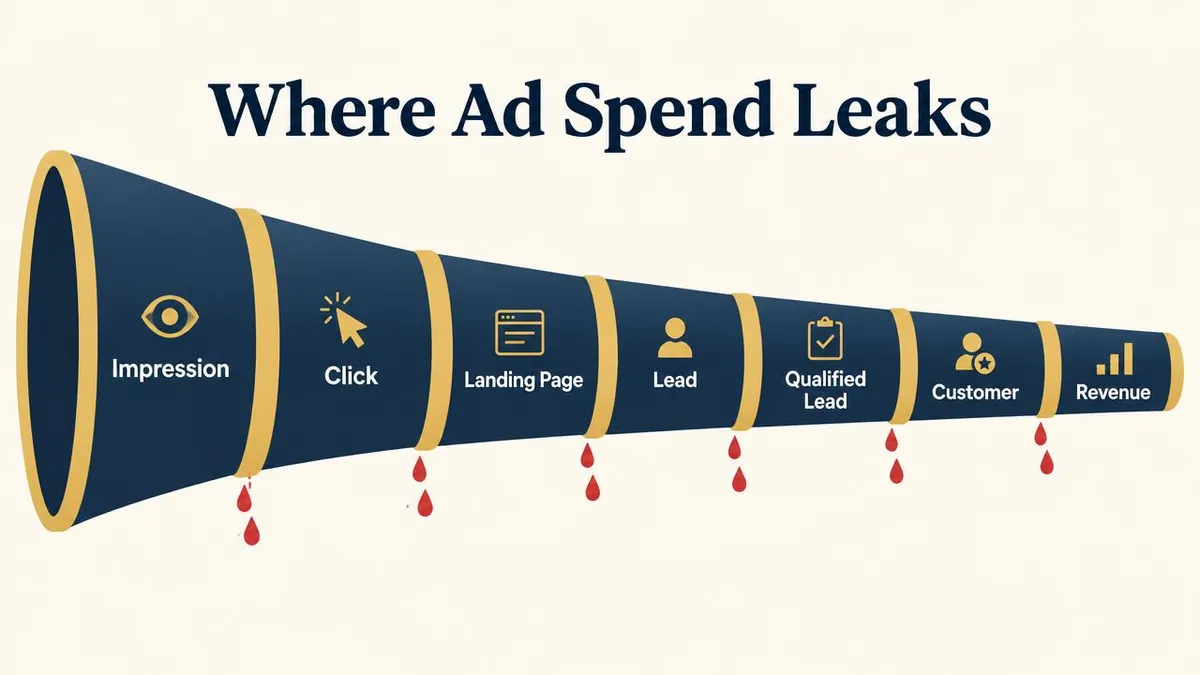
Short answer: almost all wasted Google Ads spend falls into one of eight "wrong" buckets. This is the AdsWithNikhil Wasted Spend Framework. Diagnose the bucket first; the fix usually becomes obvious.
| Leak | What it looks like | Where to look |
|---|---|---|
| Wrong search | Ads show for searches that will not become customers. | Search terms, match types, negatives |
| Wrong audience | The right search, but from people who cannot or will not buy. | Audience data, ad copy that filters |
| Wrong location | Clicks from outside your service area. | Location targeting and options |
| Wrong conversion | Google is told a weak action is success. | Conversion actions, primary vs secondary, duplicates |
| Wrong landing page | Good clicks land on a page that does not convert. | Relevance, message match, mobile, friction |
| Wrong bid | Bidding chases clicks or cheap leads rather than value. | Bidding strategy, targets, data quality |
| Wrong budget allocation | Money flows to weak campaigns while strong ones are capped. | Budget by cost per qualified lead |
| Wrong business outcome | Leads arrive, but no one checks if they become customers. | CRM feedback, revenue by campaign |
The last bucket, wrong business outcome, is the most expensive because it hides all the others. The full funnel view is explained in how to build a profitable performance marketing funnel.
100-point Google Ads audit score
Give each of the 50 checks 2 points if it clearly passes and 0 if it does not (use 1 if it partly passes). Add them up for a score out of 100.
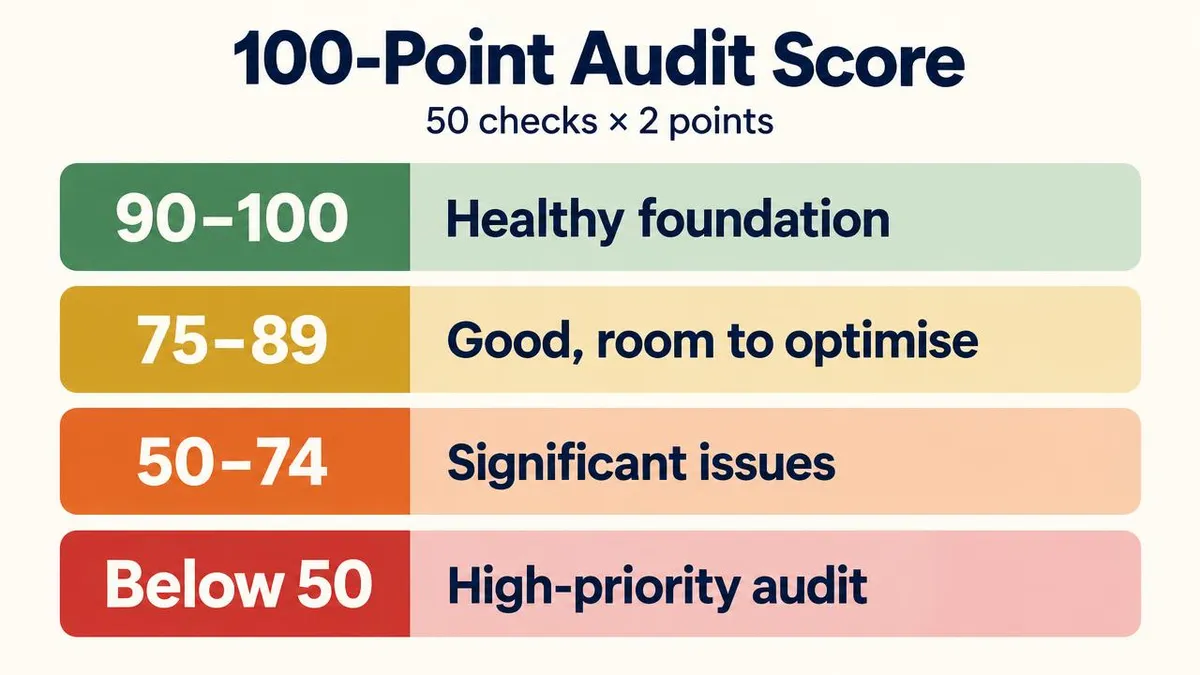
- 90–100: healthy, strong foundation. Focus on testing and scaling carefully.
- 75–89: good, but clear optimisation opportunities exist.
- 50–74: significant issues need attention before adding budget.
- Below 50: high-priority audit recommended; fix tracking and targeting first.
This is an AdsWithNikhil practical scoring framework, not an official Google Ads score. It is unrelated to Google's own Optimisation Score.
Weighting matters more than the total: a failed tracking check (checks 8–14) or a failed business-outcome check (49–50) should be fixed before anything else, even if the overall score looks fine.
How to perform a Google Ads audit step by step
Short answer: define the goal, verify tracking, review search terms, check settings, assess ads and pages, then prioritise fixes by impact.
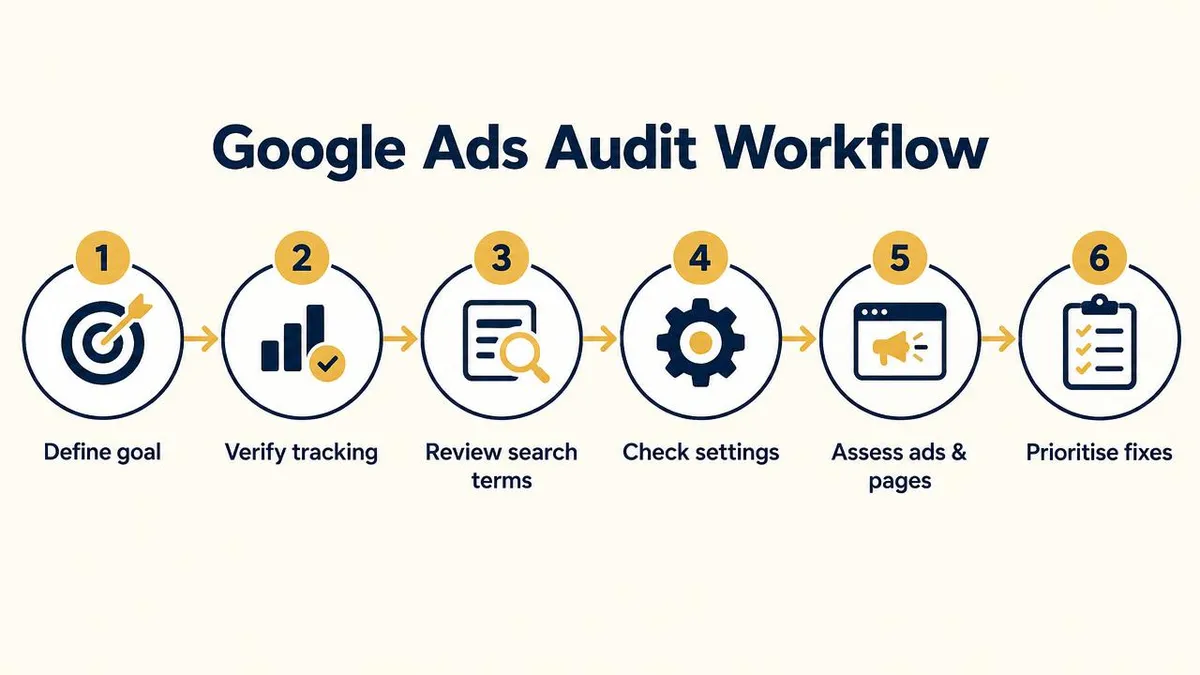
- Define the goal and date range. Write down what a good outcome is (qualified leads, sales, calls) and use at least the last 30–90 days, with a year-on-year view if seasonal.
- Verify tracking. Compare Google Ads conversions with real enquiries in your CRM, inbox or call log. Do not trust anything else until these roughly match.
- Review search terms and keywords. Sort by cost and mark each top term as relevant, irrelevant or research.
- Check settings. Locations, location options, languages, networks, schedule and devices.
- Assess ads and landing pages. Read them as a customer would, on a phone.
- Prioritise fixes. Rank by spend affected and confidence. Fix tracking and obvious waste first; test larger structural changes after.
10 warning signs your Google Ads account may be wasting money
- Many clicks, few qualified leads. Traffic is reaching you but not the right people. Start with search terms and locations.
- Irrelevant search terms in the report. Searches for jobs, free, DIY or unrelated services mean negatives and match types need work.
- Very short negative keyword lists. If there are only a handful of negatives, the same waste repeats every month.
- Conversions you cannot match to real leads. If Google reports 80 conversions and your inbox shows 30 enquiries, tracking is wrong.
- Duplicate conversion actions. Two actions recording the same form inflate results and mislead bidding.
- Clicks from far outside your area. Check the locations report: out-of-area clicks are a classic local-business leak.
- Every ad sends traffic to the homepage. Generic pages make good clicks harder to convert.
- Success judged only on cost per lead. Cheap leads that never buy are not cheap. See why cheap leads can cost more.
- Budget concentrated in the weakest campaign. Budget often stays where it was first set, not where results are.
- No link between ad data and sales. If nobody can say which campaign produced customers, every decision is a guess.
7 Google Ads audit fixes you can make today
These need no rebuild and are usually safe. How much they save depends entirely on the account.
- Review the last 30 days of search terms. Sort by cost and look at the top spenders first.
- Add obvious negative keywords. Jobs, free, DIY, course, PDF and services you do not offer.
- Check every conversion action. Confirm each primary action is a real enquiry, call or sale.
- Remove duplicate conversions. Keep one source per action and count leads once.
- Review location targeting and options. Limit to your service area and set presence-based targeting where it fits.
- Check landing page relevance. Send each major service to a matching page with a clear next step.
- Move budget away from clearly inefficient campaigns. Shift gradually toward campaigns with better qualified-lead cost.
Advanced Google Ads audit considerations for 2026
Automation now decides more of where ads show, which text appears and which page a click lands on. That makes the audit less about individual bids and more about the quality of what you feed the system.
What Google documents
- Smart Bidding uses conversion data and auction-time signals to set bids.
- Broad match is designed to work with Smart Bidding and can match related searches beyond the literal keyword.
- AI Max for Search campaigns can expand matching, adapt ad text and use final URL expansion to choose landing pages. I explain the trade-offs in Google Ads AI Max in 2026.
- Enhanced conversions and offline conversion imports let you send first-party and CRM outcome data back to Google Ads.
What I recommend auditing (AdsWithNikhil view)
- Conversion quality before automation. Do not widen matching or switch on URL expansion until primary conversions reflect qualified outcomes.
- Search terms after any expansion. Review them more often in the weeks after enabling broad match or AI Max.
- Final URL expansion. Check which pages Google is sending traffic to and exclude pages such as careers, blog or policy pages.
- Automation vs control. Keep brand terms, negatives and location settings tightly controlled even when bidding is automated.
- First-party data. Start collecting CRM stages now so you can feed qualified leads back later.
For how AI Search is changing what people type and see, read Google Ads and AI Search in 2026.
Auditing Google Ads for Indian and local businesses
A few checks matter more in India. Mobile traffic often dominates, so landing page speed and tap-to-call or WhatsApp options deserve extra attention. Many customers call or WhatsApp instead of filling a form, so call and chat tracking are often the difference between a campaign that looks dead and one that is working. Price-led searches ("cheap", "lowest", "free") are common; decide whether they fit your offer and add negatives if not. For city-level businesses, location targeting by pin code or radius is usually tighter than targeting a whole state.
If you also run Meta Ads, compare roles in Google Ads vs Meta Ads for lead generation, and see how to optimise Google Ads for revenue, not leads once your audit is done.
Frequently asked questions
What is a Google Ads audit?
A Google Ads audit is a structured review of an account's tracking, campaigns, keywords, search terms, settings, ads, bidding, landing pages and business results to find wasted spend and the changes most likely to improve qualified leads or sales.
How often should I audit my Google Ads account?
Do a full audit at least once or twice a year and whenever you take over an account, change goals or see results drop. Review search terms and conversion data far more often, weekly for most active accounts.
What does a Google Ads audit include?
Account and campaign structure, conversion tracking, keywords and match types, search terms and negative keywords, location and other settings, ads and assets, bidding and budget, landing pages, and lead quality or revenue.
How can I find wasted Google Ads spend?
Start with the Search terms report, location report and conversion actions. Spend on irrelevant searches, wrong locations, duplicate or low-value conversions and campaigns that never produce customers is usually where waste hides.
How do I check Google Ads conversion tracking?
Open Goals > Conversions, confirm each action is counted correctly, check which actions are primary, look for duplicates, test a real form submission or call, and compare Google Ads conversions with leads in your CRM or inbox.
How do negative keywords reduce wasted spend?
Negative keywords stop your ads showing for searches you know will not turn into customers, such as jobs, free, DIY or unrelated services, so budget goes to more relevant searches. Over-blocking can also cut good traffic, so review them carefully.
Should Google Ads be optimised for clicks or conversions?
For lead generation and sales, optimise for conversions that reflect real business value, not clicks. Clicks are a cost; qualified leads, customers and revenue are the outcome.
Why are my Google Ads getting clicks but no customers?
Common causes are low-intent search terms, broad location targeting, a weak or mismatched landing page, conversion tracking that counts the wrong actions, and no feedback from sales on lead quality.
How long does a Google Ads audit take?
A small single-campaign account can be reviewed in a few hours. Larger accounts with many campaigns, conversion actions and landing pages can take several days, especially if CRM data needs to be matched.
Can I audit my own Google Ads account?
Yes. This checklist is written so a business owner can work through it. An outside review helps when you are too close to the account, lack time, or need help connecting ad data to sales.
When should I hire a Google Ads consultant?
Consider it when spend is growing but qualified leads are not, when you cannot trust your conversion data, or when nobody has reviewed search terms and settings for months.
Final takeaway: audit before you scale
More budget amplifies whatever the account is already doing, good or bad. If tracking counts the wrong actions, if search terms are full of waste, or if nobody knows which campaign produced customers, scaling simply buys more of the problem. Work through the 50 checks, fix tracking and obvious leaks first, then scale only what produces qualified leads and revenue.
Sources
- Google Ads Help: About primary and secondary conversion actions
- Google Ads Help: About the search terms report
- Google Ads Help: About negative keywords
- Google Ads Help: About Quality Score for Search campaigns
- Google Ads Help: About Smart Bidding
- Google Ads Help: About enhanced conversions
- Google Ads Help: About offline conversion imports
- Google Ads Help: About AI Max for Search campaigns
Want a second pair of eyes on your account?
I review accounts personally, focusing on tracking, wasted spend and lead quality. Learn more about my Google Ads consulting and performance marketing work.
Get a Free 10-Minute Paid Ads Audit