
Conversion Tracking for Google Ads & Meta Ads: How to Track Leads From Click to Sale
Most advertising accounts can tell you how many leads came in. Very few can tell you which campaigns produced customers. That gap is a measurement problem.
By Nikhil Khachane · Performance marketer · 14 min read
Ask most business owners how their advertising is performing and they will quote a lead count and a cost per lead. Ask which campaign produced last month’s best customer and the room goes quiet.
That silence is not a Google Ads problem or a Meta Ads problem. It is a tracking problem. The platforms will optimise toward whatever you tell them to count, and if all you count is form submissions, that is exactly what they will get very good at buying.
Quick answer: Conversion tracking links advertising interactions to measurable business actions. For lead-generation campaigns it should go further than form fills and cover qualified leads, sales and revenue wherever possible. Google Ads, Meta Ads, GA4, Google Tag Manager and your CRM each hold one piece of that picture — connected, they show which campaigns produce customers rather than just enquiries.
This guide covers how tracking works on both platforms, where GA4 and GTM genuinely fit, how to connect CRM outcomes back to campaigns, and why your four reporting systems will never show the same number.
What conversion tracking actually is
A conversion is an action you decided is worth measuring. Conversion tracking is the plumbing that records it and attributes it back to the click that caused it.
Depending on the business, that action might be:
- A form submission
- A phone call from the ad or the website
- A WhatsApp enquiry
- A booking or appointment
- An online purchase and its value
- A lead marked qualified by your sales team
- A closed deal and the revenue attached to it
Tracking an action is not the same as tracking an outcome
A form submission is an action. A customer is an outcome. The first is easy to measure and the second is what funds the business — and the distance between them is where advertising budgets are usually lost.
Most accounts I look at measure actions well and outcomes not at all. The reports are accurate and the decisions made from them are still wrong, because a campaign producing forty cheap enquiries from people you cannot serve will always outrank a campaign producing six serious buyers.
Why conversion tracking matters for Google Ads and Meta Ads
Both platforms now run on automated bidding. Smart Bidding on Google and Meta’s delivery system both make thousands of decisions a day about which auctions to enter and what to pay — and both learn entirely from the conversion data you send them.
So conversion tracking is not a reporting feature. It is the instruction set your campaigns optimise against. Weak signals do not produce random results; they produce efficient waste.
Good tracking changes four things:
- Optimisation — bidding chases outcomes you actually want
- Budget allocation — money moves toward campaigns producing customers
- Lead quality — sales feedback reaches the ad account instead of staying in a WhatsApp group
- Accountability — CPL, CPQL, CAC and ROAS can be discussed with actual numbers
What each metric tells you, and what it hides
| Metric | What it tells you | Limitation |
|---|---|---|
| Impressions | How often your ads were shown | Says nothing about business value |
| Clicks | How much traffic you bought | Says nothing about lead quality |
| Leads | How many enquiries came in | Some will be unqualified or uncontactable |
| Cost per lead | What one enquiry costs | Rewards cheap leads over good ones |
| Qualified leads | How many enquiries are sales-worthy | Needs written qualification criteria |
| Customers | How many actually bought | Needs CRM or sales-side tracking |
| Revenue | What the advertising produced | Needs reliable revenue attribution |
Every row is useful. None of them is sufficient alone, and the rows most businesses report on are the top four — the ones furthest from revenue.
Why optimising only for cost per lead backfires
Consider two campaigns. This is a hypothetical illustration, not client data, but the pattern is one I see constantly.
| Campaign A | Campaign B | |
|---|---|---|
| Leads | 100 | 50 |
| Cost per lead | ₹500 | ₹800 |
| Ad spend | ₹50,000 | ₹40,000 |
| Customers | 5 | 10 |
| Cost per customer | ₹10,000 | ₹4,000 |
Campaign A wins on cost per lead by a wide margin. Campaign B produces twice the customers for less spend, at 40% of the cost per customer. On a CPL-driven report, Campaign B is the one that gets paused.
Every lever that reduces CPL — broader keywords, looser audiences, a softer offer, a shorter form — also reduces the intent of the person filling it in. That is why I keep coming back to the same point in optimising Google Ads for revenue, not leads: the metric you optimise toward is the result you will get.
How Google Ads conversion tracking works
Strategically, the chain is simple: someone clicks an ad, Google attaches a click identifier (GCLID) to that visit, your site records a conversion action, and Google attributes it back to the campaign, ad group and keyword.
Conversion actions
A conversion action defines what counts. Get this wrong and everything downstream is wrong. Fire it on genuine success — the server confirming the form went through — and never on page load or button click, which counts abandoned attempts as wins.
Primary and secondary conversions
Only primary conversions influence bidding. Newsletter signups, brochure downloads and pricing page views belong in the secondary column: visible in reporting, not steering your budget. A single account with eight primary conversion actions of wildly different value is effectively telling Google that all eight are equally desirable.
Enhanced conversions
Enhanced conversions send hashed first-party data — typically an email address — with the conversion to improve matching when cookies are unavailable. Worth enabling for most lead-generation accounts, provided your privacy policy and consent handling cover it.
Offline conversion imports
This is the upgrade that matters most for lead generation. You store the GCLID with the lead, and when that lead qualifies or closes, you upload it back to Google Ads with a value and a date. Bidding then optimises toward clicks that historically became customers rather than clicks that became forms.
Not every business needs every method
- Local service business — call tracking and WhatsApp click tracking usually matter more than anything else, since that is how people enquire. See Google Ads for local businesses for the campaign side of this.
- Lead-generation business — form conversions plus offline imports of qualified leads
- B2B — demo requests as the primary conversion, with opportunity and closed-won imported later given the long cycle
- Real estate — enquiry as primary, site visit booked and completed imported offline
- Education — enquiry as primary, counselling call attended and admission as the outcomes worth importing
- E-commerce — purchase with dynamic value, which makes value-based bidding straightforward
If you are running automated campaign types, this matters even more — Google Ads AI Max makes far more decisions on your behalf, and every one of them is based on your conversion data.
The broader shift is covered in the guide to Google Ads and AI Search in 2026, including why richer search intent makes sales-stage feedback more valuable.
How Meta Ads conversion tracking works
Meta’s model is similar in principle and different in mechanics. Its optimisation is driven by events, and the quality of your events determines the quality of your delivery.
Meta pixel
The pixel is browser-side and records standard events — Lead, Purchase, ViewContent and so on. It is also the part most affected by ad blockers, browser restrictions and consent choices, so treat it as one input rather than the source of truth.
Conversions API
The Conversions API sends the same events server-side, which is more durable. Run both with matched event IDs so Meta deduplicates them; run both without matching and you will double count every conversion you have.
Choosing the right event
Optimising for the Lead event optimises for form submissions, and Meta is extremely good at finding people who submit forms. If those people are not buying, the delivery system is not misbehaving — it is doing exactly what it was asked. This is the root of most complaints about why Meta Ads leads can be low quality, and the reason so many accounts see Meta Ads leads but no sales.
Sending back offline and CRM signals
Send a custom qualified-lead event, or an offline purchase event with value, once the outcome is known. Matching is probabilistic rather than exact, so use it to steer optimisation, not to audit revenue. For the campaign-side counterpart to this, see Meta Ads lead generation.
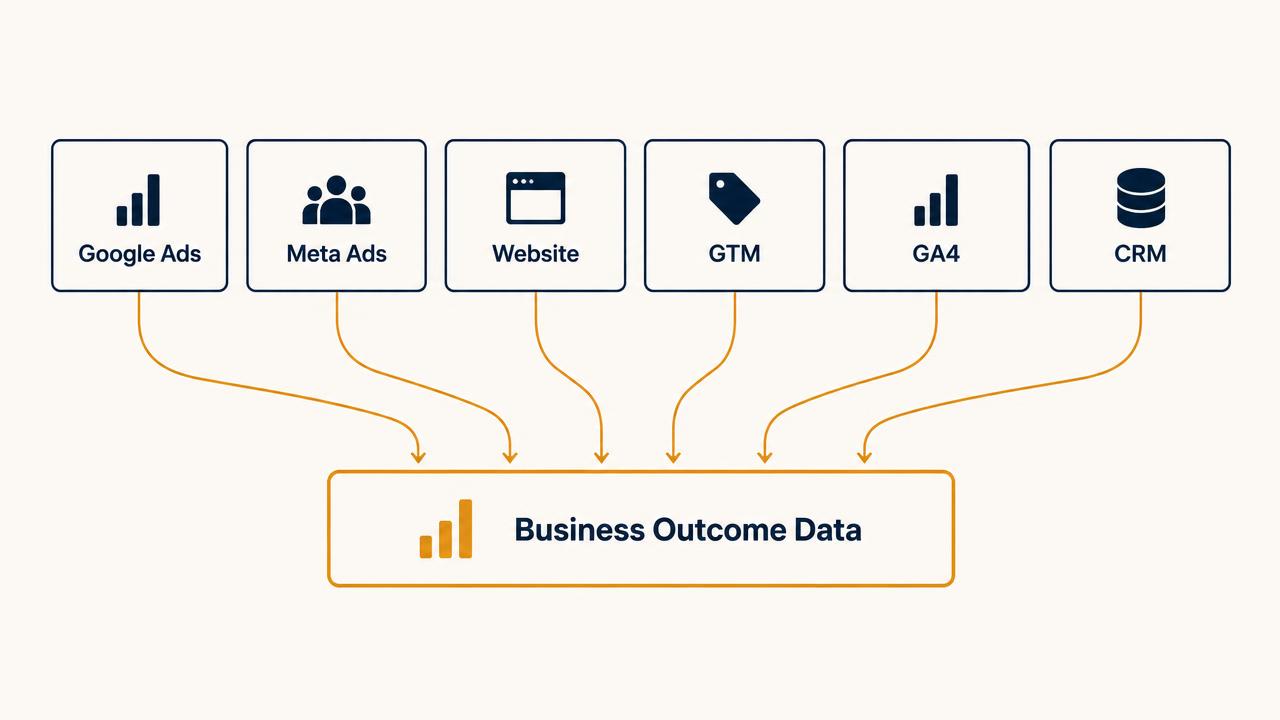
Where GA4 and Google Tag Manager fit into conversion tracking
These two get blamed for a lot of problems they did not cause, usually because their roles are misunderstood.
- Google Tag Manager deploys and manages tags. It does not measure anything itself — it decides which tags fire, when, and with what data, and lets you test that before it matters.
- GA4 measures behaviour across your whole site and all channels. It is where you compare paid against organic, see what people did before converting, and build audiences.
- Google Ads and Meta measure their own conversions for their own attribution and bidding. This is what actually trains your campaigns.
- Your CRM records what happened after the enquiry: qualification, sales status, revenue. No ad platform can know this on its own.
GA4 does not replace native Google Ads or Meta conversion tracking, and importing GA4 conversions into Google Ads alongside the Google Ads tag is the most common double-counting mistake I find. Pick one source per conversion action.
If you would rather have this built and verified properly than debug it yourself, that is exactly what I do as a conversion tracking consultant in Pune.
Why CRM tracking is the missing piece for lead generation
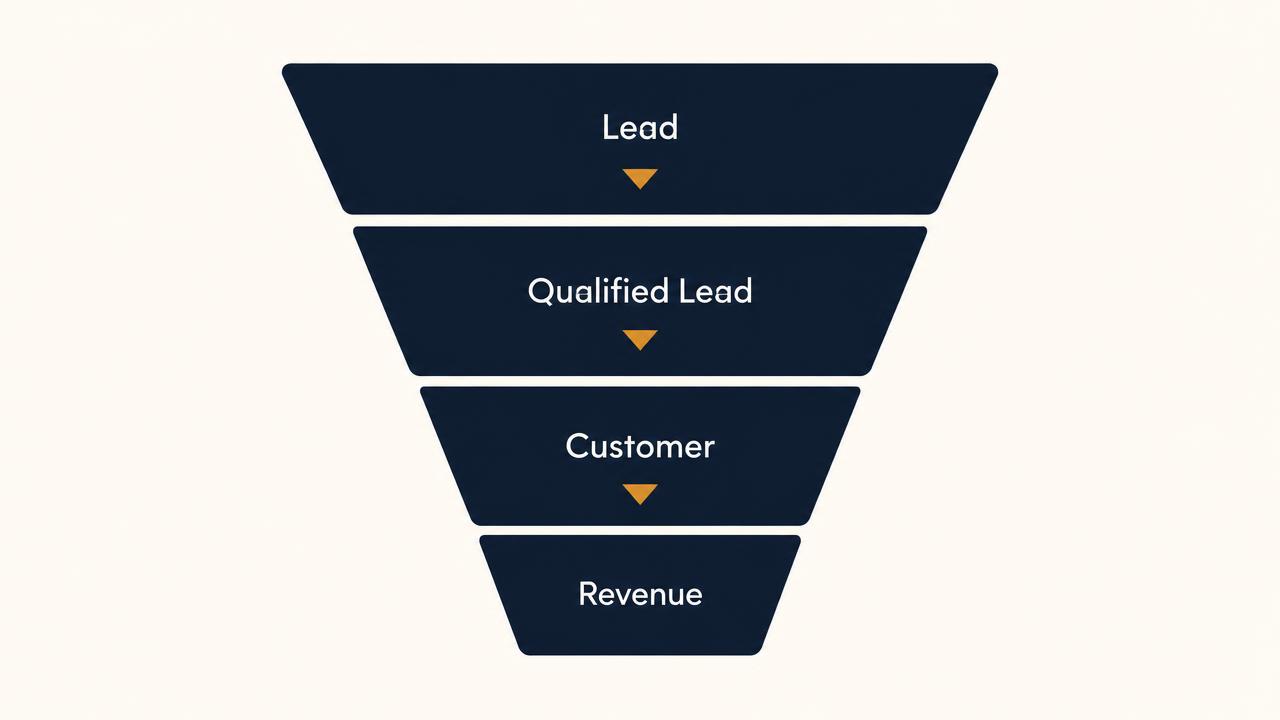
Three statements that look obvious and are routinely ignored in reporting:
- A lead is not a qualified lead
- A qualified lead is not a customer
- A customer is not automatically attributable revenue
A lead-generation business that measures only the first stage is optimising less than a quarter of its funnel. The stages worth tracking:
New Lead → Contacted → Qualified → Sales Opportunity → Won → Revenue
A coaching institute in Pune running Meta Ads might generate 200 enquiries a month. If 60 are contactable, 25 attend a counselling call and 8 enrol, then admissions per campaign is the only number that should be driving budget. The other 192 records are context.
None of this requires expensive software. It requires that the click identifier travels with the lead into whatever system sales actually uses, and that someone updates status honestly. The technical work is usually a day. The habit is the hard part.
How to track qualified leads instead of just leads
Start by writing down what qualified means for your business, and get sales to agree to it. Typically some combination of:
- Located where you can actually serve them
- A genuine need for what you sell, now or in a defined window
- Budget in the range you operate in
- Contactable — they answered
- Decision-making authority, for B2B
Then measure it:
Cost Per Qualified Lead = Ad Spend ÷ Qualified Leads
Segment it by campaign. Cost per qualified lead at account level is interesting; at campaign level it is actionable, because it tells you exactly where to move budget. Add a lead score if volume is high enough to justify it, and always record source, medium and campaign against every record so quality can be traced back.
The full metric set — CPQL, lead-to-sale rate, CAC, revenue per lead — is covered in performance marketing metrics.
How to track leads from ad click to sale
Nine steps. Most businesses have one to three in place. The value compounds as you add the rest.
STEP 1
Track the ad click
Auto-tagging in Google Ads appends a GCLID to every click; Meta appends its own click identifier. Leave auto-tagging on. This parameter is the thread that connects everything that follows — lose it here and no amount of CRM discipline later will reconnect the sale to the campaign.
STEP 2
Capture campaign and source information
Store the click ID and UTM parameters in hidden fields on every form, and persist them across pages so a visitor who browses before enquiring still carries their original source. Use one UTM convention across Google, Meta and everything else — inconsistent casing alone can split one campaign into four rows in a report.
STEP 3
Track the lead as a real conversion
Fire the conversion on genuine success — the server confirming the submission — not on button click or page load. Track calls and WhatsApp clicks too if that is how your customers actually enquire. A local service business measuring only form fills is usually blind to most of its demand.
STEP 4
Send the lead into your CRM with its source
The lead record must arrive with the click ID and campaign attached. A spreadsheet works if it is disciplined; a CRM works better. What does not work is sales working from a WhatsApp group while marketing works from a dashboard, with nothing linking the two.
STEP 5
Track qualification
Whoever speaks to the lead marks it qualified or not, against criteria agreed in advance and written down. This single field is the difference between reporting lead volume and reporting lead quality, and it takes about four seconds per lead to maintain.
STEP 6
Track sales status
Contacted, qualified, opportunity, won, lost — and a reason when lost. Loss reasons are marketing data: "budget too low" repeated across a campaign tells you your targeting or your offer framing is bringing in the wrong people.
STEP 7
Record the customer and the revenue
Attach the deal value to the record. Without value, every customer looks equally valuable and the campaign bringing in your largest deals gets treated the same as the one bringing in your smallest.
STEP 8
Feed meaningful outcomes back to the platforms
Upload qualified leads or closed sales into Google Ads as offline conversions, and send equivalent events to Meta through the Conversions API. Now bidding is being trained on your business outcomes instead of on form submissions. Start with qualified leads if sales volume is low — value-based bidding needs enough conversions to learn from.
STEP 9
Optimise against business outcomes
Review campaigns on cost per qualified lead and cost per customer, not cost per lead. Shift budget toward what produces customers, and expect your cost per lead to rise as your cost per customer falls. That trade is the entire point.
This chain is the measurement layer underneath a profitable performance marketing funnel — the funnel describes what should happen, the tracking tells you whether it did.
Generating leads but unsure which campaigns produce customers?
I'll review how your Google Ads, Meta Ads, GA4 and CRM data connect, where the chain breaks and what you'd need to see revenue by campaign. No pitch, no obligation.
Get a Performance Marketing AuditWhy Google Ads, Meta Ads, GA4 and CRM numbers don’t always match
They never match. Not through incompetence — because each system is answering a different question, over a different window, with different rules about what counts.
- Different attribution models — Google Ads uses data-driven attribution by default, GA4 applies its own, Meta credits views as well as clicks
- Different reporting windows, and Google Ads backdating conversions to the click date while your CRM records the enquiry date
- Clicks versus sessions: one click can create several sessions, and one session can contain several clicks
- Duplicate events from a tag firing both directly and through GA4 or GTM
- Tracking loss from ad blockers, browser restrictions, consent choices and iOS privacy features
- Different conversion definitions — a "lead" in the pixel and a "lead" in your CRM are often not the same thing
- Offline and imported conversions arriving days after the click they belong to
- Time zone differences between the ad account, the analytics property and the CRM
- CRM records changing status after the fact — a lead marked as junk today was counted as a conversion last week
Use ad platform data to optimise campaigns. Use CRM data to judge the business result.
A gap of 10–20% between systems is normal and not worth chasing. A gap of 300%, or a direction of travel that disagrees between systems, is a real tracking fault worth investigating.
Common conversion tracking mistakes businesses make
Tracking only form submissions
Calls and WhatsApp enquiries are often the majority of demand for local and service businesses. If they go unmeasured, the campaigns driving them look like failures and get cut.
Counting page views as conversions
A thank-you page view that fires on load, or a contact page view counted as a conversion, teaches bidding to buy browsers instead of buyers.
Duplicate conversion events
The same conversion imported from GA4 and fired by the Google Ads tag inflates every number, halves your apparent cost per acquisition, and hides the real performance of every campaign.
No connection between ads and CRM
Without the click ID travelling with the lead, you can report how many enquiries arrived but never which campaign produced customers.
No lead-quality feedback loop
Sales knows which leads were worthless. If that never reaches the ad account, the platform keeps buying more of them — efficiently.
Optimising only for cost per lead
Every lever that lowers CPL — broader targeting, softer offer, shorter form — also lowers intent. Cheap leads are easy to buy and expensive to own.
Not separating primary and secondary conversions
Newsletter signups and brochure downloads have value, but they should not be in the same bucket as sales enquiries. Marking them secondary keeps them visible without letting them drive bidding.
No UTM discipline
Inconsistent naming turns your source reporting into noise. Agree a convention, document it, and use it everywhere.
Installing tracking and never testing it
Use GTM preview, Google's tag diagnostics and Meta's event tools to submit a real test enquiry and watch it arrive. A broken tag found after three months of spend is an expensive lesson.
No revenue feedback at all
If nobody ever compares ad spend against revenue closed, the advertising is being managed on faith.
Changing conversion setup mid-flight without noting it
A redefined conversion action makes this month incomparable with last month. Record the date of every tracking change so performance shifts can be explained.
Making decisions only from the ad dashboard
The ad platform sees clicks and conversions. Your business sees customers and revenue. Only one of those pays salaries.
The conversion tracking framework I recommend
Five levels. The higher you can measure, the better your budget and optimisation decisions become — and the fewer arguments you have about whether the advertising is working.
LEVEL 1
Traffic
Impressions · Clicks · CTR
Diagnostic only. Useful for spotting delivery and relevance problems, useless for judging business performance.
LEVEL 2
Leads
Forms · Calls · WhatsApp · Enquiries
Where most businesses stop. Enough to run campaigns, not enough to judge them.
LEVEL 3
Lead quality
Qualified leads · Sales-ready leads · Cost per qualified lead
The first level where marketing and sales look at the same reality. Requires written qualification criteria.
LEVEL 4
Sales
Appointments · Opportunities · Customers
Now campaign decisions can be made on outcomes. Requires CRM status discipline more than technology.
LEVEL 5
Revenue
Revenue · CAC · ROAS · Revenue per lead
The level where budget decisions become obvious, because you know what each campaign is worth.
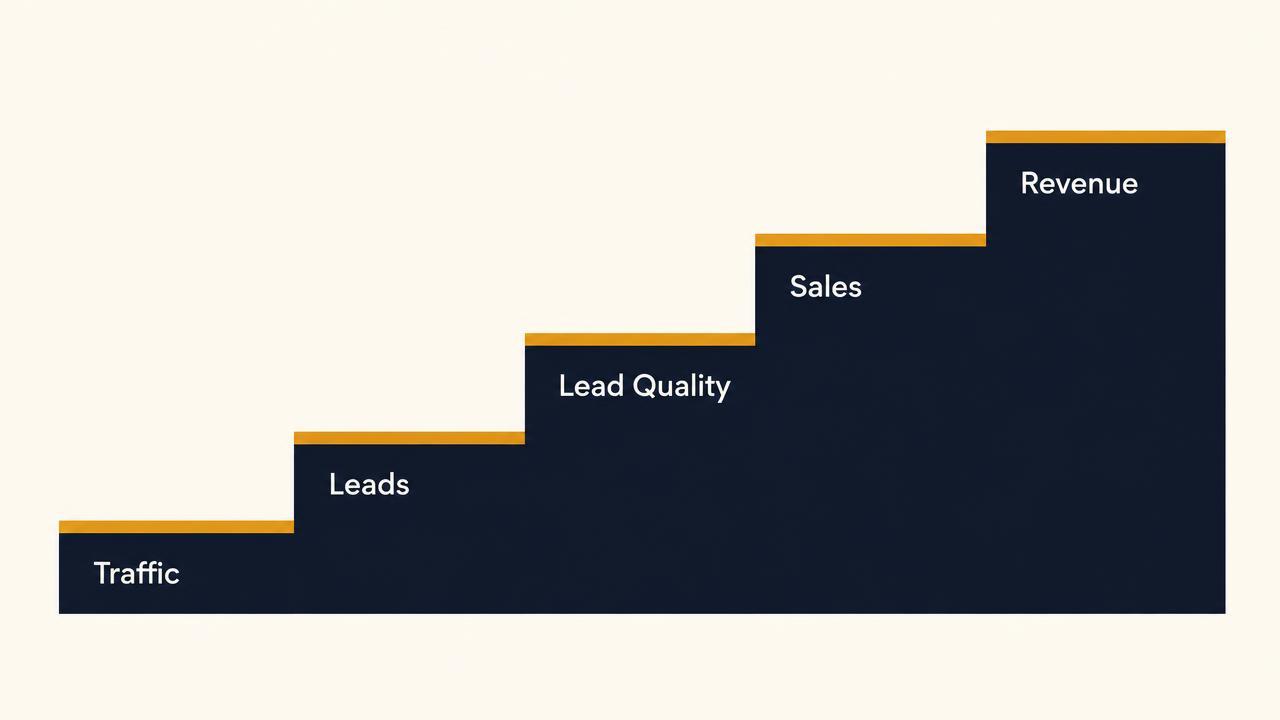
Businesses that plateau at level two often assume the advertising has stopped working. More often the campaigns are fine and nobody can see past the lead count — which is the pattern behind ads generating leads without business growth.
What should you track based on your business?
Conversion setups should reflect how customers actually buy from you. These are sensible starting points, not universal rules.
| Business type | Conversions worth tracking |
|---|---|
| Local services | Calls, WhatsApp enquiries, qualified enquiries, bookings |
| Real estate | Qualified enquiries, site visits booked, site visits completed, bookings |
| Education | Enquiries, qualified leads, counselling calls attended, admissions |
| B2B | Demo requests, qualified opportunities, proposals sent, customers |
| E-commerce | Add to cart, checkout started, purchases and purchase value |
| Coaching and consulting | Applications, discovery calls booked and attended, customers |
Whichever list applies, keep one or two primary conversions driving bidding and put the rest in secondary. A focused signal beats a complete one.
For the platform-level side of these decisions — where each channel fits in the customer journey — see Google Ads vs Meta Ads for lead generation. For ongoing management, I work with businesses as a Google Ads consultant and Meta Ads consultant.
Are you tracking leads — or tracking revenue?
If your advertising generates enquiries but you cannot say which campaigns produced qualified leads and paying customers, the bottleneck is probably measurement rather than the advertising itself. You are not making bad decisions; you are making decisions with a quarter of the information.
Start where the gap is widest. For most lead-generation businesses that is the handoff between the ad platform and the CRM — get the click identifier travelling with the lead, get a qualification field being filled in, and you can answer questions this month that were unanswerable last month.
Track what the business needs to grow, not what the platform finds easy to count.
Find out what your tracking is hiding
A short review of your conversion setup across Google Ads, Meta Ads, GA4 and CRM — what's measured, what's duplicated, what's missing, and what it would take to see revenue by campaign.
Get a Performance Marketing AuditFrequently asked questions
Conversion tracking is the process of recording the actions people take after interacting with your advertising, and connecting those actions back to the campaign, ad group and keyword or audience that caused them. It can cover form submissions, calls, WhatsApp enquiries, bookings and purchases — and, when set up properly, qualified leads and closed sales too.
Related articles
How to Get Recommended by AI Search
A practical, no-guarantees guide to building the clarity, expertise, content, authority and technical access that support discovery across search and AI answers.
Google Ads and AI Search in 2026
AI Search is changing how people express intent and how Google Ads interprets it. A practical guide to campaigns, landing pages, conversion data and qualified growth.
Ads Working But Business Not Growing?
Clicks, leads and a healthy cost per lead — and flat revenue. The Ad-to-Growth Framework and the ten places business growth actually breaks after the click.
Want this done for your account?
I run these campaigns for startups, e-commerce brands and local businesses from Pune — across India and the GCC.
Google Ads consultant in Pune
Search, Shopping and PMax managed for qualified leads.
Meta Ads consultant in Pune
Facebook and Instagram campaigns built around offer and creative.
Performance marketing consultant in Pune
Strategy, execution and measurement under one owner.
Google Ads lead generation
Lower cost per qualified lead, not just cheaper clicks.
Conversion tracking consultant in Pune
GA4, GTM, Meta CAPI and offline conversion imports.